Showing posts with label Twitter. Show all posts

Twitter phishing scam spreads via direct messages

A new phishing scam is spreading through Twitter via direct messages, according to several reports.
Itamar Kestenbaum writes on his JewNews.net blog that he received a direct message on his Twitter account from someone he didn't know that said "rofl this you on here?" followed by a link to what appeared to be a video-related Twitter page.
The page looks like a legitimate Twitter log-in page but nabs your credentials if you type in your password, he warns.
Meanwhile, a posting on the Mashable blog said the site had received multiple reports of the new phishing scam and that someone there had even received one of the phishing-related direct messages themselves.
No word on this yet on Twitter's official blog or from a Twitter spokesperson. We'll keep you posted as we hear more.
In the meantime, if you clicked on the phishing link and typed in your credentials, you should change your password immediately.
Update at 5:30 p.m. PDT: Twitter acknowledged the phishing scam in a tweet on Wednesday that said "A bit o'phishing going on--if you get a weird direct message, don't click on it and certainly don't give your login creds!"

Twitter, Facebook attack targeted one user

A Russian activist blogger with accounts on Twitter, Facebook, LiveJournal and Google's Blogger and YouTube was targeted in a denial of service attack that led to the site-wide outage at Twitter and problems at the other sites on Thursday, according to a Facebookexecutive.
The pro-Georgian blogger, who uses the account name "Cyxymu," (the name of a town in the former Soviet Republic) had accounts on all of the different sites that were attacked at the same time, Max Kelly, chief security officer at Facebook, told CNET News.
"It was a simultaneous attack across a number of properties targeting him to keep his voice from being heard," Kelly said. "We're actively investigating the source of the attacks and we hope to be able to find out the individuals involved in the back end and to take action against them if we can."
Kelly declined to speculate on whether Russian nationalists were behind the attack, but said: "You have to ask who would benefit the most from doing this and think about what those people are doing and the disregard for the rest of the users and the Internet."
Twitter was down for several hours beginning Thursday evening, and suffered periodic slowness and time-outs throughout the day.
"The people who are coordinating this attack, the criminals, are definitely determined and using a lot of resources," Kelly said. "If they're asking our infrastructure to generate hundreds of pages a second, that's a lot of pages our users can't see."
Facebook and Google were able to minimize any impact to their sites. Facebook even managed to keep the Cyxymu account accessible to Web surfers from that region, Kelly said, although it was inaccessible to people in other geographic areas, including San Francisco.
This was the first coordinated attack on the sites, and all the companies involved were working closely on the investigation, he said. "My team and the teams that are working together at all these companies are doing a really good job very quickly and I'm proud and happy," he said.
Twitter and LiveJournal did not immediately return e-mails and calls seeking comment.
A Google spokesman offered this statement: "We are aware that a handful of non-Google sites were impacted by a DOS attack this morning, and are in contact with some affected companies to help investigate this attack. Google systems prevented substantive impact to our services."

Twitter malware filter 'disappointing'

Twitter's new malware filter is a sign the social media site is stepping up efforts to stem attacks, but the measure has its shortcomings, say security experts.
Twitter's filtering mechanism was highlighted by Mikko Hyponen, chief research officer of F-Secure, in a blog post Monday. When a user tries to submit a tweet with a suspect Web link, the following warning appears:
"Oops! Your tweet contained a URL to a known malware site!"
Twitter's latest security measure was a positive one, especially in light of the current threats directed at the site, Hyponen told ZDNet Asia in an e-mail interview. The site, he noted, has been "attacked in many ways" including spam, worms such as Mikeyy, and phishing, he noted.
"None of these problems are at epidemic levels yet, but it's great to see Twitter take real action on this," he said.
Hacking is another challenge the popular microblogging site faces. In May, Twitter confirmed its network was hacked and some individual account information were leaked.
Dancho Danchev, independent security consultant and cyber threats analyst, noted that the site's latest security move was an indication "Twitter is finally moving from reactive to proactive security practices". However, he pointed out in a blog post on ZDNet Asia's sister site ZDNet.com, that the malware filter was "clearly still in development" and showed "disappointing results".
Danchev pointed to how a MySpace phishing page used in a tweet triggered the security filter, but was eventually accepted by adding a "http://" or removing the "www".
He noted that the site also allowed tweets containing links to several known malicious sites listed in Stopbadware's database, which has identified over 380,000 sites identified as unsafe. While it would not prevent the abuse of Twitter in the longer term, the failure to integrate such databases listing known malware was a "missed opportunity", Danchev said.
Twitter did not respond to e-mail queries from ZDNet Asia at press time.

Malicious Twitter Posts Get More Personal

One recent report by Rik Ferguson said that malicious Twitter posts are getting dangerously more customized, increasing the possibility of users getting hooked into malicious schemes.
A Twitter spambot is said to have been used in launching this recent attack. The spambot creates Twitter accounts and fashions them to appear as legitimate accounts by posting seemingly harmless posts like those sharing certain music they listen to, or websites they visit. The spambot accounts then post tweets directed to unknowing users, sharing a link to a PC repair tool they allegedly came across and used.
As Rik Ferguson mentioned, the spambot posting tweets directed to specific users is a noteworthy social engineering technique that was clearly not seen as suspicious by Twitter admins. The spambot accounts were apparently created prior to a spam cleanup recently conducted by Twitter.
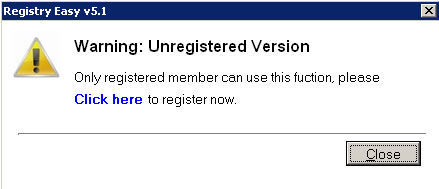
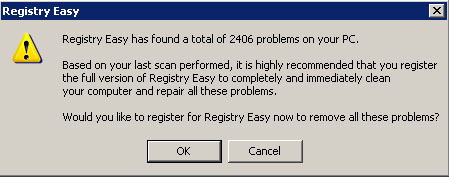
Additionally, the spambot uses the URL shortener Doiop.com to mask the original URL in the posts, and for a not so good reason. The URL directs to a URL that triggers a couple of redirections that ultimately lead to the download of the file RegistryEasy.exe, which is detected as TROJ_FAKEAV.DAP. TROJ_FAKEAV.DAP comes off as an application that repairs registry problems. However, in true FAKEAV style, it merely displays false results to convince the user into purchasing the product.
Click Click Click
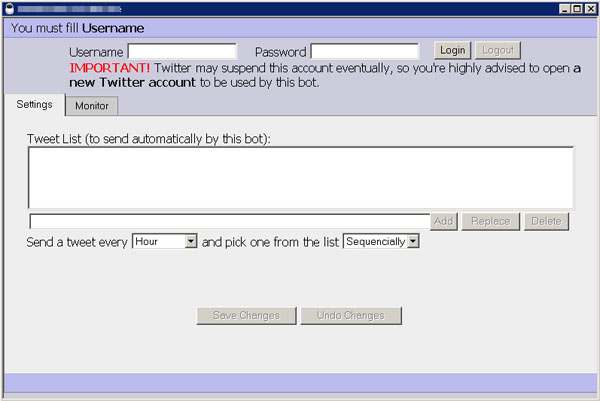
What’s also interesting is that in the root of one of the URLs the user is redirected to, an advertisement for an application dubbed as Bot Lite is posted. Bot Lite is, as the post describes, a light Twitter bot that virtually anyone can use.

Click
Rik confirmed that Bot Lite does function as a spambot for Twitter. Its file name is bot_lite_100.exe. Its detection name is HKTL_FAKEBOT. HTKL_ is the detection prefix used by Trend Micro for hacker-tools which are considered to be grayware. Grayware refers to applications that have annoying, undesirable, or undisclosed behavior but do not fall into any of the major threat (ie. Virus or Trojan horse) categories.

Twitter’s Security Meltdown

This is serious. TwitterTwitterTwitter has a big security problem. Let’s rephrase that – most aspects of Twitter – user accounts, admin accounts, various personal accounts of important people in the company’s hierarchy, Evan Williams, are (or at least, have been) security Swiss cheese. There have been so many problems over the past couple of months that it’s getting hard to keep track of them. It’s time to fix it once and for all, because these security issues are a dark shadow looming over the otherwise bright future of this company.
Accounts of several famous Twitter users were hacked or compromised in January, and then later in May and June. Of course, some of these were compromised through third party services, such as TwitPicTwitpicTwitpic; others could have been attributed to the users’ negligence.
Back in April, we received a tip that several French sites had images from Twitter’s admin panel. It was a tough call to decide whether these were authentic or not; our bet was yes, and judging by the latest posting on one of these sites, they were. This same site (link omitted on purpose) now holds images from various personal accounts of Twitter co-founder Evan Williams, including PayPal, Amazon, GmailGmailGmail and MobileMeMobileMeMobileMe.
We will not publish any of these documents. The word is out, the documents are out there and easy to find, and there are so many of them that it’s hard to imagine that Twitter’s security as a whole – the service, the company, the people behind it – hasn’t been severely compromised in the last couple of months. Twitter’s laundry – dirty or not – is out there for anyone to see, and we’ll let everyone choose what they want to see for themselves.
But there’s no denying that Twitter has a problem. If a document that shouldn’t be published gets published every couple of weeks; if a well-known Twitter account gets hacked every couple of weeks, how will you convince users that their data on this service is safe and secure?
One thing is certain. Twitter needs to burn everything security-related down to the ground and build it all anew to make sure this won’t happen again. Employees should adopt stricter security practices; services that don’t offer adequate security should be replaced with better ones; in short, Twitter needs to seriously rethink its attitude towards security and privacy in all aspects of their work.
*Update: It has been suggested in the comments that the article implies that Twitter users should fear for the security of their PayPal, Gmail, or other accounts due to Twitter’s security issues. Although I do not see how you can read that from the article, I feel it’s important to make it absolutely clear: there’s absolutely no reason to believe that being a Twitter user implies a security risk to your other accounts. The article merely goes on to show that Twitter, both as a company and as a service has had a number of security incidents over the last couple of months, and that they need to improve their overall track record when it comes to security.

Clickjacking: Hijacking clicks on the Internet

What if you reached to grab a newspaper out of a news stand and you found a rock in your hand instead? How about opening the front door to a grocery store and ending up on a boat?
This sounds like a Matrix movie, but the virtual equivalent of this is real and poses one of the most serious new risks on the Internet, according to Jeremiah Grossman, chief technology officer and co-founder of Whitehat Security.
"Most exploits (like worms and attacks that take advantage of holes in software) can be patched, but clickjacking is a design flaw in the way the Web is supposed to work," Grossman said. "The bad guy is superimposing an invisible button over something the user wants to click on...It can be any button on any Web page on any Web site."
The technique was used in a series of prank attacks launched on Twitter in February. In that case, users clicked on links next to tweets that said "Don't Click" and then clicked on a button that said "Don't Click" on a separate Web page. That second click distributed the original tweet to all of the Twitter user's followers, thus propagating itself rather quickly.
At the time, Grossman called it a "harmless experiment", but the potential for harm by an attacker who isn't just having fun is huge.
In a demo at the offices of ZDNet Asia's sister site CNET News.com on Thursday, Grossman showed how someone could launch a clickjacking attack using Flash to spy on someone by getting them to turn on their computer Web cam without knowing it.
Like the name suggests, clickjacking is the hijacking of your click, unbeknownst to you. A victim may not even know that the click has been redirected, which means there could be clickjacking attacks going on that no one knows about yet.
Clickjacking attacks are accomplished by creating something called an iFrame that allows a browser window to be split into segments so that different items can be shown on each. This code is inserted into the target Web page and is invisible to the end user. When the end user's cursor clicks on the section of the page where the malicious iFrame is hiding, the attack is launched to do whatever the attacker desires.
An attacker could hide an iFrame under any innocent link on any Web page--a headline on the New York Times or a "digg this" button on Digg, for instance--and when the victim clicks on the link, the cursor is actually clicking on the hidden iFrame.
In the Web cam demo, the iFrame created contains a Flash pop-up window that asks the user to grant permission to have the Web cam turned on. When the victim clicks the link, the Web cam is turned on and secretly begins recording everything the user does in front of the computer.
One of the scariest things about clickjacking is the potential for abuse. An attacker could spy on you by turning on your Web cam or microphone, direct you to a Web page with malicious content that is downloaded onto your computer, or even rig it up so you end up clicking "buy" instead of "cancel" on an e-commerce site.
Another thing that makes clickjacking so serious is that there really is very little that end users can do to protect themselves, Grossman said.
In the Web cam scenario, the best defense is probably to put a post-it note or other item over the Web cam lens and to disable the microphone in the software, he said. Flash Player 10 provides some protection by preventing anything from obscuring the security permissions dialogue box, he said.
Web site owners optimizing their sites for Internet Explorer 8 have the ability to prevent pages from being framed in, which means visitors to their site will be safe, only on that site and only if they are using IE8, Grossman said.
People using Windows and IE should disable JavaScript to help protect against clickjacking, he said. Firefox is safer; the NoScript add-on for Firefox not only lets people selectively block scripts, but it has a ClearClick feature designed specifically to protect against clickjacking, he added.
People should also log out of Web sites, like Facebook and Twitter, when they are done using them for the time being. "You can't be forced to do something on the site if you are not logged in," Grossman said.
More details are in a white paper on the technique, written by Grossman and Robert Hansen of SecTheory and published in September 2008. Grossman and Hansen coined the term in that document.
The authors cancelled their talk on the subject at the OWASP (Open Web Application Security Project) conference that month at Adobe's request because their proof of concept revealed a bug in Adobe's software, according to IDG News Service.

Deja vu: New scams hit Facebook and Twitter

Phishers were having a field day with Facebook and Twitter on Thursday.
A new phishing scam hit Facebook users that, like others in recent weeks, sends them to a Web site which steals their log-in information and also secretly downloads malware onto computers when they visit the malicious Web site in what is known as a "drive-by download".
Meanwhile, Twitter users were getting messages from new followers that were posting links to a fake Twitter site with "tvvitter" in the tiny URL, Graham Cluley of Sophos wrote in his blog. His blog has a video of the phishing attack in action. Twitter representatives did not immediately respond to e-mails seeking comment.
In the Facebook attack, messages circulated with a subject line of "Hello" and a prompt to check out "areps.at" or other URLs ending in ".at".
The URLS, before being blocked, directed the visitor to a fake Facebook page. If you logged in to the site, it would steal your e-mail and password, log you into Facebook, automatically change your password, and send the same message to all your Facebook friends, according to the All Facebook blog.
The malicious Web sites also spread the Koobface worm and install the Trojan.BHO, among other malware, onto unsuspecting computers, according to a CNET News test using Internet Explorer. But the URLs were blocked by Firefox and flagged as a "Web Forgery" as of 9:50 a.m. PDT.
"Whoever is behind the scam has been steadily amassing a large number of e-mail addresses and passwords over the past few weeks," the blog says. "Some days as much as three scams will spread throughout the site (possibly even more). Facebook rapidly shuts down all references to the site but by then the scam has spread to thousands of users."
Facebook spokesman Barry Schnitt said: "The impact of this attack or the previous ones are not widespread and only impacted a tiny fraction of a percent of users. We've been updating our monitoring systems with information gleaned from the previous attacks so that each new attack is detected more quickly."
The site has blocked links to the new phishing sites from being shared on Facebook, added them to the block lists of the major browsers, and is working with partners to have the sites taken down completely, he said. Facebook also is cleaning up phony messages and wall posts and resetting the passwords of affected users.
Other safe computing tips from Facebook:
--Use an up-to-date browser that features an anti-phishing black list. Some examples include Internet Explorer 8 or Firefox 3.0.10.
--Use unique logins and passwords for each of the Web sites you use.
--Check to see that you're logging in from a legitimate Facebook page with the facebook.com domain.
--Be cautious of any message, post, or link you find on Facebook that looks suspicious or requires an additional login.
--It is important that impacted users reset all accounts (not just Facebook) that use the same credentials. We believe the bad guys here are phishing an account and then trying those credentials on webmail providers. So, for example, if a user is compromised on Facebook and has the same login and password for their Gmail, the attacker may be able to intercept the Facebook password reset and compromise the account again in the future. This is one of the reasons why people need unique passwords for their online accounts.
--Become a fan of the Facebook Security Page (www.facebook.com/security) for more updates on new threats as well as helpful information on how to protect yourself online.
Separately, some Facebook users reported difficulty accessing the site on Thursday morning. It was unclear whether the connectivity issues were related to the phishing scam.

Twitter spoofing: The next logical exploit

First it was spoofing e-mail, then IM, and now spoofing Twitter is the new means of exploit. How attractive really is the ROI for attackers?

I just completed an article titled "URL shortening: Yet another security risk", in which I discussed URL shortening and how phishers/attackers subverted it to drive unsuspecting users to malicious Web sites.
After reading the many comments, I was happy to note that in general users are getting savvier about misdirection exploits.
This appears to apply to Twitter as well, even though messages or tweets, with shortened links make it more vulnerable.
Fortunately, Twitter has an additional advantage in that we the users get to pick who can send us tweets. This capability significantly reduces the risk simply because you know who's sending you the message.
Well, maybe not
I've just finished reading an article by Washington Post's Brian Krebs titled "Twitter security hole left accounts open to hijack". It seems that it's not that difficult to spoof Twitter messages.
Krebs quoted Lance James a security researcher and author of "Phishing exposed":
"Anyone could authenticate and hijack a Twitter account by using SMS spoofing services, such as my-cool-sms.com, or phonytext.com. These Web sites allow users to mask what phone number they are texting from by letting the user input whatever phone number they want to appear in the from field."
Oh great, this totally negates the one advantage that Twitter had over IM and e-mail. It's not hard to see that phishers/attackers would want to leverage SMS spoofing along with URL shortening to redirect victims to malicious Web sites.
Help from the cellular network operators
One good thing that Krebs alluded to was the fact that SMS spoofing may only work if the attacker is located outside of the United States:
"Twitter co-founder Biz Stone wrote in an e-mail.[Mobile] carriers in the U.S. have their own systems for blocking SMS spoofing. Indeed, most U.S.-based mobile carriers have put in place measures to block SMS spoofing on their networks. But this is generally not the case for international mobile networks."
It appears that United States is one of the few countries forcing cellular carriers to clamp down on SMS spoofing. That's great, but spoofing Twitter messages is still possible just about everywhere else. I'll give you two guesses where most phishing and malware exploits originate, and the first one doesn't count.
Proof of concept
H Security (a German security company) verified that SMS spoofing works in an article titled "Twitter spoofing fix fails in UK and Germany". The article provides the following details of the process:
"In the UK, we had a mobile phone associated with a Twitter account. By taking only the number of the mobile phone and setting it as the sender field on PhonyText then sending an SMS to +447624801423, the UK number for sending SMS tweets, we were able to see our message appear in the tweets on the honline page."

The article goes on to explain what this potentially means:
We then promptly removed the association between the phone and the Twitter account. An attacker could have created a message directing followers to malware sites, to other risky locations on the web, or posted tweets designed to ruin the reputation of the account owner."
What this means
First, the ability to spoof a Twitter message enhances all the normal misdirection schemes that are already in play. The fact that shortened URLs are common place in Twitter messages makes it even easier to pull the scheme off.
The damages from the SMS spoofing and URL shortening exploit can be as simple as malware being loaded on victims' computers to as complex as stealing sensitive financial information from the victims. Also a cruel joke could be played on Twitter accounts that don't have unlimited texting. It would be easy to run up some monster phone bills as noted in the Twitter support section:
"Twitter charges you nothing, but how much it costs to use Twitter with text messaging depends on your text messaging plan. Standard text messaging rates (such as international text messaging fees) do apply. Consult your service provider to ensure that your text plan covers your Twitter usage. If you're using our international number, give your provider the Twitter phone number you'll be using to see if you'll incur extra charges. If you're using Twitter from outside of the US, please consult your carrier, as every provider has a different policy."
Final thoughts
Following spoofing's logical progression was easy for the phishers and malware creators of the world. Yet, from the comments I've read, it seems like it's getting harder for them to find chinks in the armor. That's good and should be heartening to all of the people who are trying to keep the Internet the amazing place it is.
Still, there needs to be awareness and vigilance as long as the possibility of a ROI is perceived by the dark side.